
Home / Features / Stream Manager / Polls
Polls
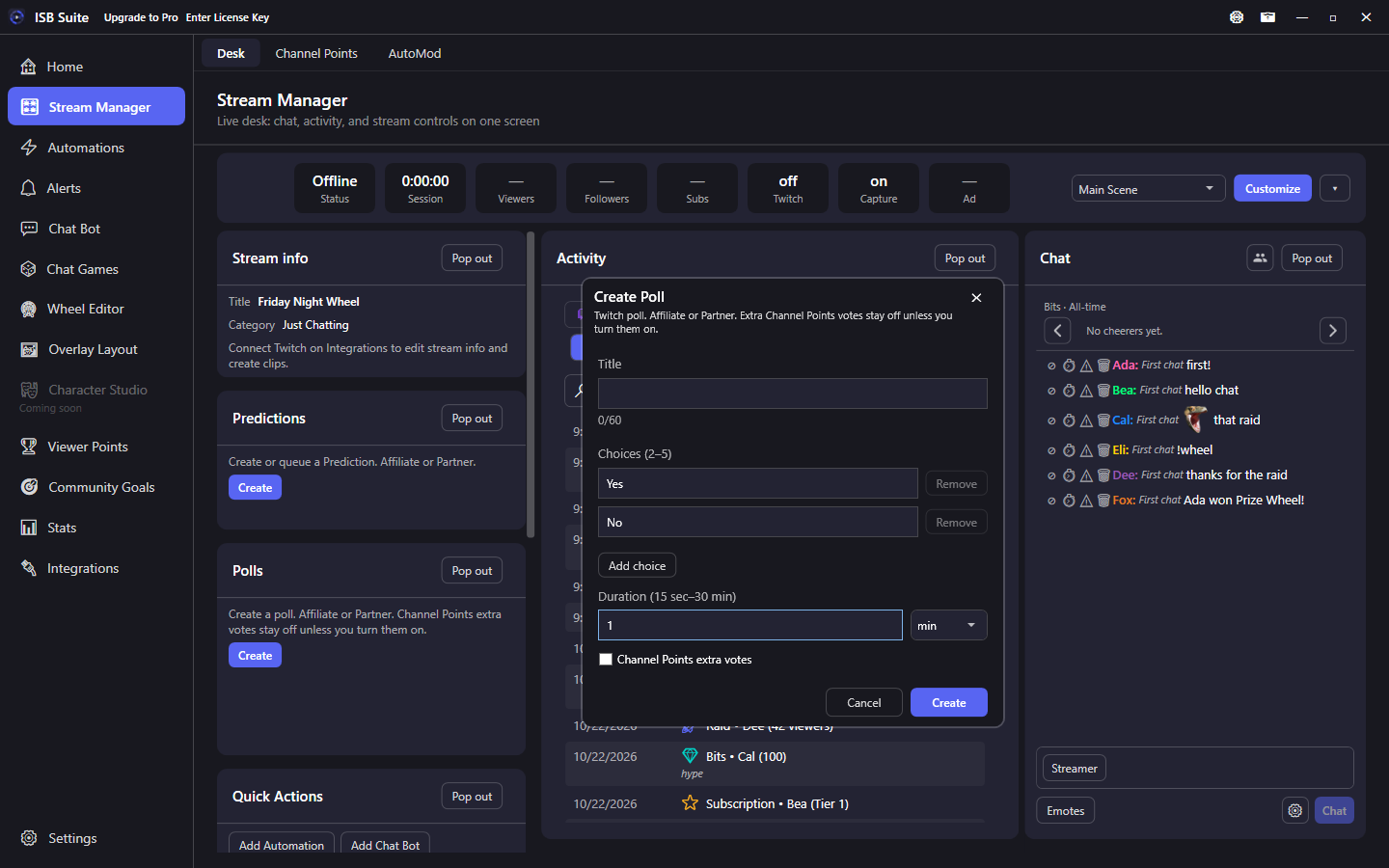
The Polls tile creates a Twitch poll from the desk and manages the live one. Create opens a popup for the title, 2-5 choices, and the duration. Channel Points extra votes stay off unless you turn them on. While a poll is ACTIVE, the tile shows the title, time left, and vote counts, with End and Cancel. End keeps the results on Twitch. Cancel removes the poll. A finished poll stays on the tile for 15 seconds, and a new poll replaces it immediately. Queue next holds drafts that start after the live poll ends. There is no queue cap.
At a glance
- Desk tile, visible by default under Predictions.
- Title max 60 characters. Choices 2-5 (default Yes / No), 25 characters each. Duration 15 seconds to 30 minutes (default 1 min). Enter sec or min.
- Channel Points extra votes are off unless you check them. Cost is 1 to 1,000,000 points per extra vote.
- Requires Affiliate or Partner and
channel:manage:polls. Re-authenticate Twitch once if you connected before this feature. - Only one poll can be live. Create is hidden while one is live. Queue next, and the Create Poll action when a poll is already live, save the draft here. There is no queue cap.
- A successful create from the tile or from an automation records Activity. Stream Manager Chat shows the same poll above the transcript, including one started on Twitch.
Create
- Connect Twitch on Integrations. Grant poll management if prompted.
- Open Stream Manager. Click Create on the Polls tile.
- Enter a title, at least two choices, and a duration (seconds or minutes). Leave Channel Points extra votes off unless you want them. Create sends the poll to Twitch.
The tile then shows the live poll. Activity shows the created title.
Manage
While a poll is running, the tile shows the title, remaining time, and a bar for each choice. End stops it early and leaves the results on Twitch. Cancel asks first, then tells Twitch to remove the poll. Stream Manager Chat shows the same poll above the messages and keeps the result up for 30 seconds. Close it sooner with the X, including when nobody voted. That also clears this tile. End and Cancel stay on this tile.
After the duration, the result stays on the tile for 15 seconds. A clear winner stays bright and the other choices fade. A tie stays even, and a poll with no votes stays even. A new poll replaces the result immediately. The tile also picks up a poll started on Twitch or by an automation.
Queue
While a poll is live, Create stays hidden. Queue next opens the waiting list, shows how many are waiting, and saves the draft on this PC with no cap. Queue next inside that list adds another. Remove a row from the list. The Create Poll action also queues here when Twitch already has one ACTIVE. When the live poll ends, is ended, or is canceled - here or on Twitch - ISB Suite starts the next queued poll even if Stream Manager is closed. A title Twitch rejects stays queued so it does not retry on its own. Reconnect Twitch if the queue says it is paused.
Limits
- Twitch allows one live poll per channel. You cannot edit the title, choices, or duration after create.
- Bits voting is not offered here.
- Related: Create Poll action for rules. Activity shows the created title. Chat shows the live card.