
Activity
A Twitch-style feed of events this app saw - follows, subs, bits, raids, redeems, and more - even when no automation or alert is set up.
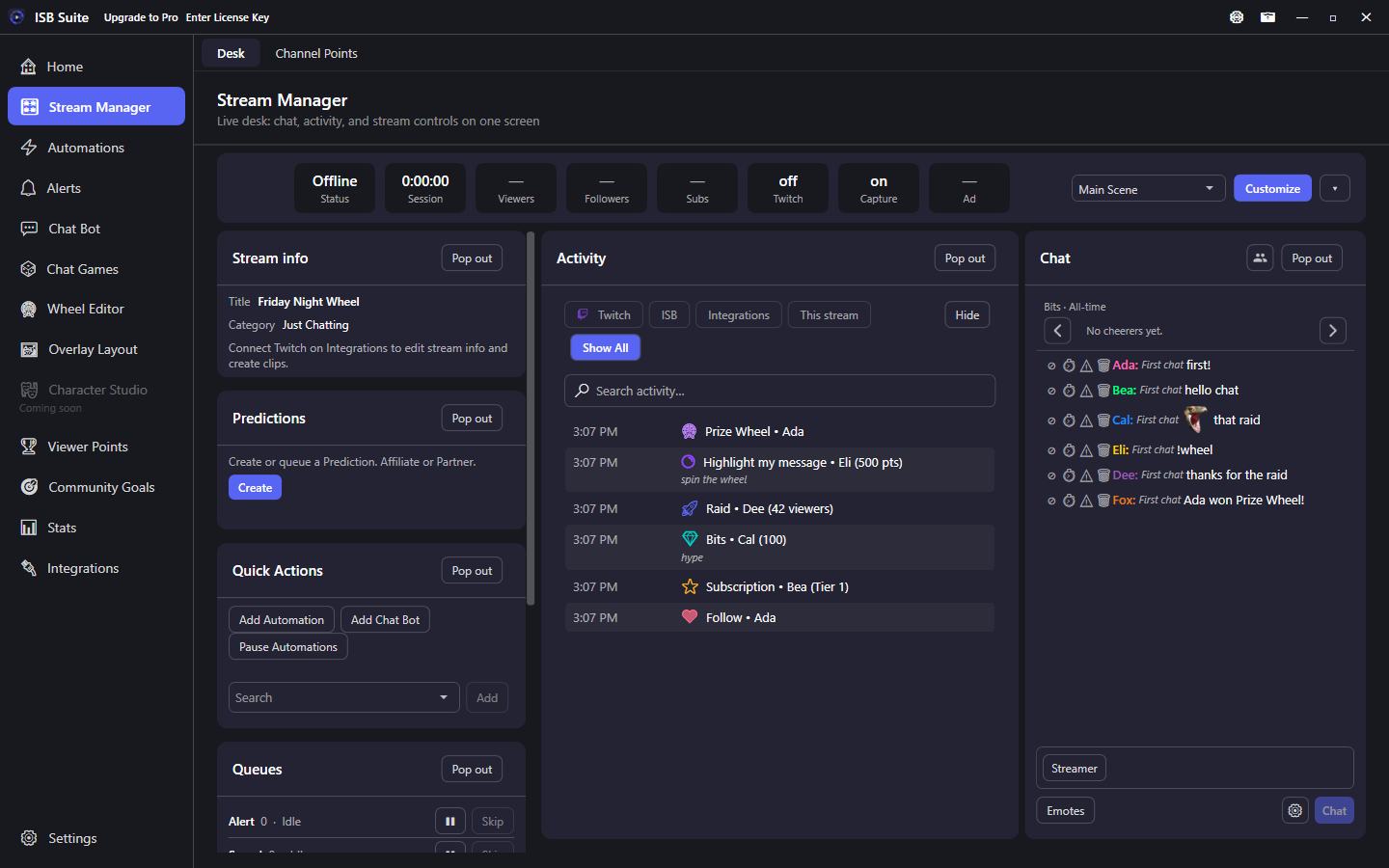
At a glance
- Nav rail: Stream Manager, Activity tile on the desk.
- Filter chips: Twitch, YouTube, ISB, Integrations, This stream. Show All is the default. Hide can drop event families (follows, subs, bits, channel points, raids, watch streaks, YouTube, and more). Chips and Hide stay saved on this PC; leaving Stream Manager only clears search. Hiding Watch streaks hides the Activity row only. The chat Events checkbox still hides the banner on its own.
- Customize can Add Activity (up to 8) so each copy has its own chips and Hide. Hide parks a saved copy; Reset to default parks extras in Hidden (custom names kept). Delete on the card or X on that Hidden chip removes it. Rename any desk card in Customize.
- Search the list by name, command, reward, or kind.
- Newest events stay at the top. The list updates live while you stay on the page. Times from earlier days say Yesterday or N days ago instead of only a clock time.
- Giveaways, chat games, and point drops stay on one row. The line updates as people join or claim, then shows who won, no entries, cancelled, or how the drop ended. Details lists everyone. Search still finds a person when the row is collapsed.
- Kind icons paint in a solid theme color so they are easier to scan live. Twitch events keep their own hues. In-app marks (giveaways, wheels, ads, walk-ons, goals, Viewer Points) each have a distinct color; automation fires use the ISB indigo. Follows use a purple heart. Channel-point redeems use a circle with an inner highlight so they do not look like gift subs; the same purple mark is used on Channel Points chrome elsewhere in the app.
- Subs, gifts, bits, Power-Ups, channel-point redeems, and watch streaks show the extras Twitch shows: tier, months, cost, streak length, and the viewer's attached message on a second line when they wrote one. A watch streak is recorded even when no automation matches. Viewer Points shop redeems still show the item and price.
- History is stored on this PC (about the last 2,000 events or 7 days).
- YouTube Super Chat, Super Sticker, New Member, milestones, and membership gifts use the YouTube chip, not Integrations.
- Tiltify donations, rewards, goals, and milestones appear when Tiltify is connected (Integrations chip).
- Resend on a row replays that stored alert on the overlay. It does not re-run the automation (no extra counters, chat, or points).
- ISB chip: wheel winners, giveaways, chat games, community goals (reached, check, and contribute), Viewer Points commands (balance, give, gamble, redeem, admin give - including aliases), point drops (one row per drop; Details lists who claimed), counter tiers, live timer ended, walk-ons, first-time chatters, timed messages (Chat Bot and Automation timers), and automations that ran without an alert.
- Integrations chip also shows Spotify song requests:
!srqueues and!remove(not every skip poll or automation Spotify action). - Related: Stream Manager, Channel Points, Alerts, Automations, Integrations.
How to use it
- Connect Twitch (and YouTube or Tiltify, if you use them) on Integrations.
- Open Stream Manager from the left nav. Activity is a desk tile.
- Use chips to narrow the list, Hide to drop event families, or search to find a person, command, or reward. ISB shows outcomes this app produced. YouTube shows Super Chat and memberships. Integrations shows Tiltify and Spotify song requests. This stream keeps only events from the current broadcast. Customize can Add Activity up to 8 copies, each with its own chips and Hide. Hide parks that saved copy. Reset to default parks extra copies in Hidden and keeps the names you set. Delete on the card or X on that Hidden chip removes it. Rename any desk card in Customize.
- On a giveaway, chat-game, or point-drop row, click Details to see who joined or claimed.
- If a row has Resend, click it to play that alert again. The automation does not run a second time.