
Home / Features / Stream Manager / Chat
Chat
Chat is ISB's own transcript on the desk: emotes, a viewers list, and Bits or Gifted leaderboards. It is not a Twitch popout.
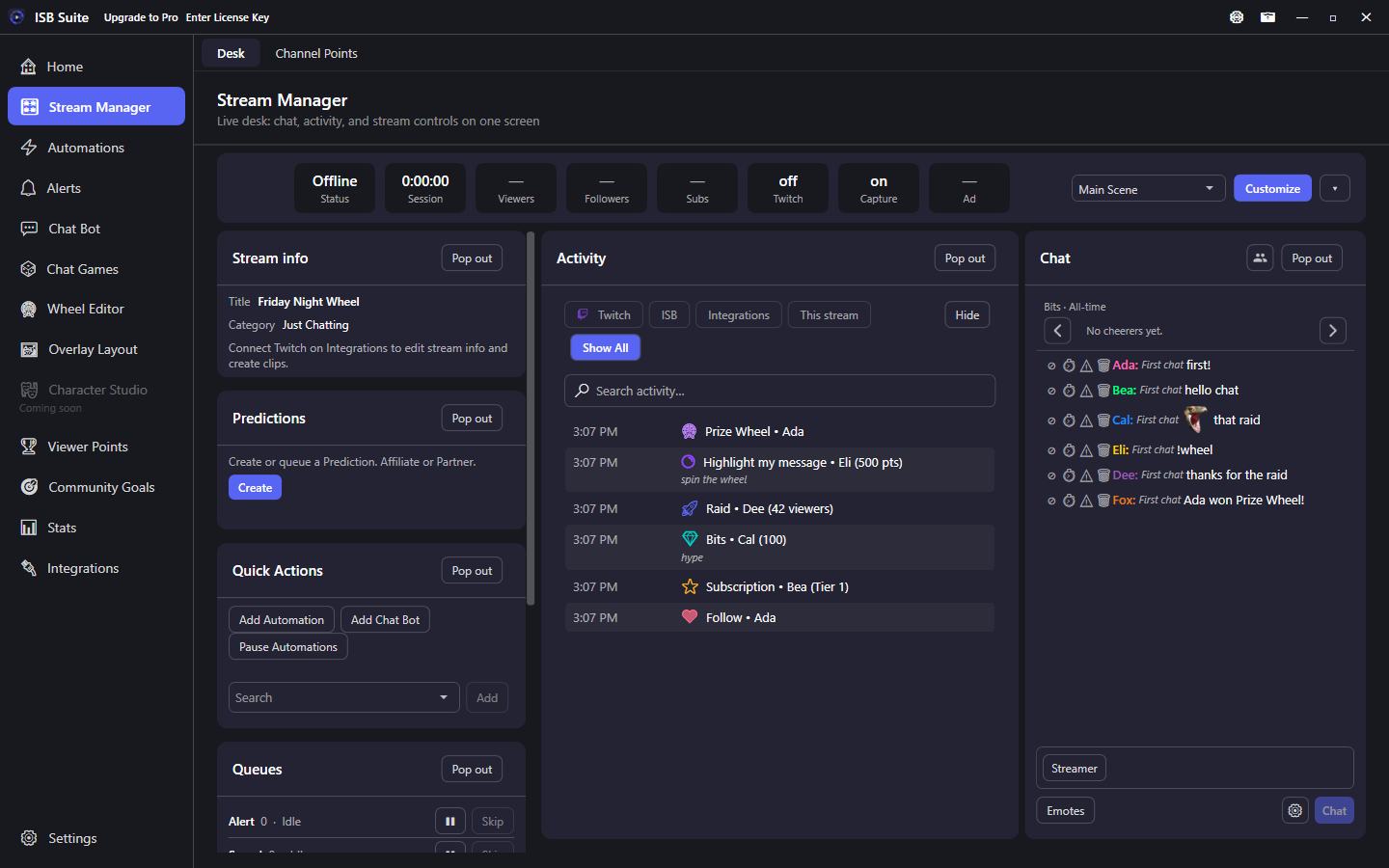
At a glance
- Desk tile. People currently in chat (live or offline) are not the Stream CCV count.
- Viewers from the Chat title-bar icon or the Viewers tile (hidden by default).
- In the chat box, type the start of a name and press Tab to fill it. Tab again for the next name, A to Z. Shift+Tab goes back. Names come from people already in that chat and everyone on the viewers list. If nothing matches, Tab stays in the box.
- Twitch and YouTube lines share this tile. Each name has a platform mark. Show Twitch / YouTube can hide one platform (both on or both off shows everything).
- Twitch reply only (under Show, next to YouTube): when ISB posts the same bot reply to Twitch and YouTube, this box shows the Twitch line. Turn it off to see both again. Each Chat card saves its own choice. It starts off.
- YouTube names use the same random wheel palette as the on-screen Chat Box, because YouTube does not send a name color.
- Chat settings: Bits period, timestamps, Slow mode, Mod actions, Readable colors (off by default; lightens hard-to-read name colors), Text size (slider; default is the theme size), and Show bots (ISB replies plus Nightbot-style) / commands / viewer chat / event kinds (saved on this PC). Everything starts on except Readable colors; uncheck what you do not want.
- AutoMod is the other Stream Manager tab. It deletes keyword hits and links that are not allowed. That delete uses the same Twitch permission as the delete button on a message.
- Customize can Add Chat (up to 8) so each copy is a full Chat card with its own Show filters (for example a bots-only box next to viewer chat). Hide parks a saved copy; Reset to default parks extras in Hidden (custom names kept). Delete on the card or X on that Hidden chip removes it. Rename any desk card in Customize.
- Gift, resub, inbound raid, shoutout-received, watch-streak, and announcement lines use a kind-colored accent; only names, tiers, and counts take that color.
- A /shoutout card at the top of Chat shows the channel, last category, and whether you already follow them (Follow or Following). It stays 15 seconds if you already follow them or 60 seconds if you do not, with a thin remaining bar at the bottom. Twitch's 2-minute / one-at-a-time send limits still apply.
- Type
/raid loginin Chat to start a Twitch raid (not posted as chat). Errors say if you are not live, the login was not found, or you need to reconnect Twitch forchannel:manage:raids. - An outgoing raid card shows the target, party size, Auto-joined, and a 1:30 countdown. Leave, then Join raid again. It stays up for Twitch's 90-second window and will not stack a second card.
- A resub (or other event) message wraps as that viewer's named chat line under the banner.
- Cheers tint the chat line and turn cheer100 into 100 + a bits gem only when bits actually arrived.
- Twitch Power-ups and YouTube paid chat paint on the line the same way as the on-screen Chat Box: a giant emote, Emote Party, Rainbow Eclipse, Cosmic Abyss, Highlight My Message, Super Chat, Super Sticker, and member milestone chat. The Bits amount sits after the name. See Chat Box.
- Channel Point redeems show a points mark and cost.
- https links in a message are underlined and open in the browser.
- Hover an emote to see its name. Click it (not a drag) for a card that says where it came from and shows related emotes from that channel or from Twitch. BetterTTV, 7TV, and FrankerFaceZ show the provider name.
- Twitch GIF Keyboard images show about the size of a gigantified emote, in the GIF's own shape, with rounded corners. Hover shows the GIF name. They stay on the Chat Box when Twitch emotes are off.
- Highlight a username, URL, or message in the transcript and copy it (Ctrl+C). This is not a Twitch popout.
- A hype-train fill bar under the Bits/Gifted leaderboard shows percent to the next level and hides when it ends.
- In the last minute before a scheduled Twitch mid-roll, a card at the top of Chat counts down with Snooze and Run now. Run now hides that card. Ads running and the time left appear when Twitch starts the break, then the card hides when it ends.
- Scroll up in chat and a Latest button appears to jump back to the newest messages.
Transcript
In the chat box, type the start of a name and press Tab. s then Tab can fill Sam, and the next Tab fills the next name in alphabetical order. Shift+Tab walks back. Names come from people who have already chatted in this transcript and from everyone on the viewers list (Twitch chatters and YouTube names shown there). Typing does not search; the lookup runs when you press Tab. If nothing matches, Tab stays in the box.
Messages paint in the Chat tile with Twitch emotes (and BTTV / 7TV / FFZ when those catalogs load). Twitch GIF Keyboard images paint in that line too, about the size of a gigantified emote and in the GIF's own shape, with rounded corners. Hover shows the GIF name. Hover an emote to see its name, then click it for a card that names the channel or Twitch and shows related emotes from that set. BetterTTV, 7TV, and FrankerFaceZ name the provider. YouTube lines use the same list with a YouTube mark. Timeout, ban, and deleted-message lines from YouTube paint as mod notices when Mod actions is on. See YouTube. Drag to highlight a username, URL, or message and copy it (Ctrl+C). New lines keep following the bottom while you stay pinned there. Scroll up to read history and a Latest button appears over the transcript; click it to jump back to the newest messages. https links in the message are underlined and open in your browser (https only). A hype-train fill bar under the Bits/Gifted leaderboard shows percent to the next level (and the live level) and hides when the train ends; it is not a chat line. When you send an official /shoutout, a compact card at the top of Chat shows that channel (avatar and last category when Helix returns them) and says Following or Not following. Follow opens their Twitch page; Following stays on the card when you already follow them. The card stays 15 seconds if you already follow them or 60 seconds if you do not (Twitch does not publish official display seconds). A thin bar along the bottom of the card shrinks as that time runs out. Twitch send limits still apply: it will not replace a card that is still up, and it will not show again until the 2-minute cooldown ends (or 60 minutes for the same channel). A shoutout you receive still paints as a tinted chat line. Type /raid login (or /raid @login) in the composer to start that official raid. Twitch will not treat a chat line that starts with /raid as a raid. You must be live; reconnect Twitch under Integrations if a notice says you are missing channel:manage:raids. When you raid out, a compact card shows that channel, party size, Auto-joined (Twitch puts you in the raid), and a live 1:30 countdown. Leave backs you out; Join raid puts you back. Twitch keeps its raid window up for 90 seconds (or until Raid Now / Cancel); our card uses that same 90 seconds and will not stack a second outgoing raid card. EventSub reports the raid when it actually goes, not when the countdown starts. Channel Point redeems with text merge onto the chat line and show a points mark plus cost. Empty input stays a muted redeem notice. Cheers highlight the same chat line (no second bits notice) and replace cheer100 with 100 + a bits gem only when Twitch sent bits for that line. Gift, resub, inbound raid, shoutout-received, watch-streak, announcement, and upgrade lines show as tinted event banners (Twitch cues, not a popout clone). Banner text stays normal; only key phrases (who raided, raid size, shoutout target, tier, months, gifter and receiver) take the event color. If the viewer typed a resub (or similar) message, it wraps under the banner as their named chat line. Resub messages and cheers keep Mod actions (ban / timeout / warn / delete) when that setting is on. Other system lines still need Mod actions on only for moderation notices.
Bits and Gifted
Chevrons on the Chat leaderboard switch Bits and Gifted subs. Gifted shows who currently gifted a still-active sub on the channel. Twitch has no API for chat's all-time / month / week Top Gifters, so those lists will not match. Chat settings period is Bits only (All-time, This month, or This week). Ranks refresh while you stay on Stream Manager (after cheers or gifts, and about once a minute) so you do not have to leave the page.
Settings
The gear at the bottom of Chat picks timestamps, a Slow mode switch for the room, Mod actions (ban / timeout / warn / delete on messages plus those lines in chat), and Readable colors (off until you turn it on; lightens dark Twitch and YouTube name colors so they stay readable on the dark pane). YouTube names use the same random wheel palette as the on-screen Chat Box, because YouTube does not send a name color. Show starts with everything on. Uncheck Bots to drop ISB bot messages (Send Message, Chat Bot replies, and timed posts, plus known bots such as Nightbot), Commands to drop any line that starts with !, Chat messages to drop viewer chat (not bots or commands), and Events to drop families: channel points, bits, subs, resubs, gifts, raids, shoutouts, watch streaks, announcements, and the hype-train bar. Leave only Bots checked for a bot box. Lines you type as Streamer stay in Chat messages; Bot identity lines stay under Bots. Outgoing /raid and /shoutout cards stay visible. Reconnect Twitch once if a button says it needs newer permissions. Customize can Add Chat up to 8 copies. Each copy is a full Chat card (send, identity, emotes, leaderboard, Slow mode, Mod actions) with its own saved Show set, so you can keep a bots-only tile next to viewer chat. Hide parks that saved copy. Reset to default parks extra copies in Hidden and keeps the names you set. Delete on the card or X on that Hidden chip removes it. Rename any desk card in Customize if Chat 2 is not the name you want.