
Wheel
Animated prize wheels with chat join, mod control, presets, custom colors, and per entry win actions.
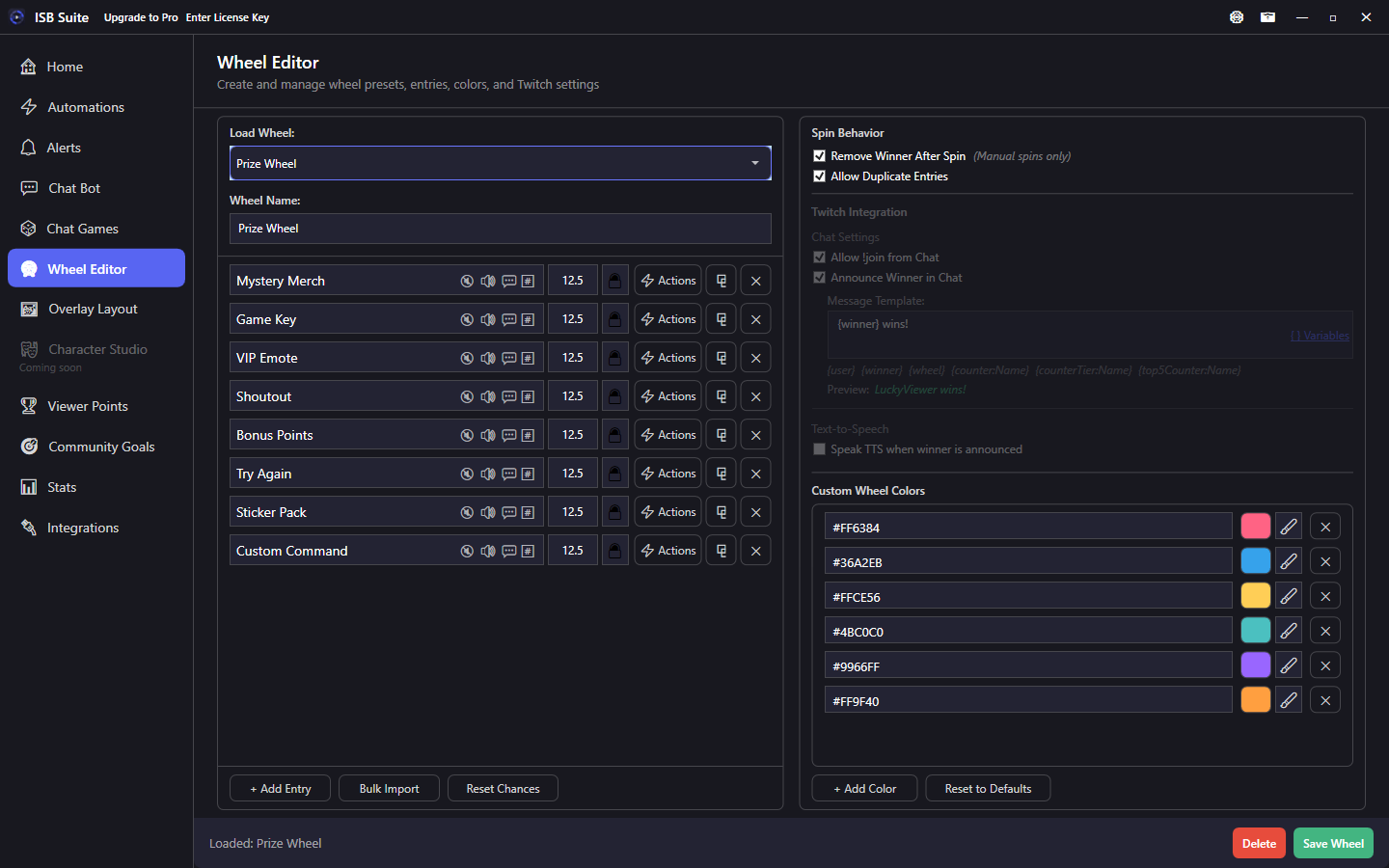
At a glance
- Free: 3 wheel presets. Full table on Free and Pro.
- Viewers join with
!joinwhen a session allows chat join. - Mods and broadcaster:
!startwheelspin,!spinwheel,!endwheelspin,!resetwheelspin. - Transparent background for Window Capture. Related: Queues and Giveaways, Automations, Use cases, Chat commands.
Overview
Create and customize wheels from the Wheel Editor tab. Save multiple presets (for example a prize wheel, a game picker, or a category picker) and load them from the Stream Manager Wheel card or from an automation.
Leaving Wheel Editor with unsaved changes (or switching to another wheel) shows Save, Don't Save, or Cancel. Loading a wheel and leaving without edits does not prompt.
- Smooth spin animations and custom color palettes (per wheel or per entry).
- Viewer Twitch name colors on slices when they
!join. - Configurable winner chat messages with message variables.
- Remove on win mode, allow duplicates mode, and optional equal slice sizes that leave weighted chances unchanged.
- Stream Manager Wheel card: off until you add it from Customize. Picking a preset loads that wheel. Spin and Reset, plus announce winner, remove winners, and allow duplicates, are on the same card.
- Transparent background for window capture in OBS or similar tools. See Download - Capture.
- Export Wheel and Import Package share a saved wheel. See Share a setup.
Wheel Editor settings
- Wheel Name: shown on the Stream Manager Wheel card and in
{wheel}where that variable is available. - Allow !join from Chat: let viewers add themselves during an open session.
- Remove Winners After Spin: auto-removes the winner slice so it cannot win twice on later manual spins.
- Allow Duplicates: permit the same name on the wheel more than once.
- Equal slice sizes (visual only): draw every slice the same size on the wheel and overlay. Entry chances in the % column stay as set. This does not change who wins.
- Announce Winner in Chat: send the winner message automatically. It posts in the chat that started the run (a YouTube command stays on YouTube, a timer or a manual spin stays on Twitch) unless Send to both Twitch & YouTube chats is on. That checkbox starts off, including wheels saved before it, and is separate from the entry chat response.
- Custom Winner Message: override the default
The winner is: {winner}!template. Supports variables such as{winner},{user}, and counter tokens.
Managing entries
- Add entries one at a time with + Add Entry.
- Bulk import from text with Bulk Import (one entry per line).
- Edit text, color, chance %, and per entry actions for each entry.
- Reset Chances sets unlocked entries to equal chance (this changes real odds). Use Equal slice sizes (visual only) when you want the wheel to look even without changing those percentages.
- Duplicate entries to quickly clone text, colors, and actions.
Color customization
- Default palette: automatic rainbow distribution across all slices.
- Custom palette: click the color squares in the editor to set hex values for the wheel.
- Per entry color override: set a specific color for individual entries.
- Twitch user colors: applied automatically when viewers
!join.
Chat and Twitch
Connect Twitch on Integrations so chat commands and EventSub work.
- Viewers:
!joinduring an open session (when Allow !join is on). - Mods and broadcaster:
!startwheelspin(empty wheel, enables join),!endwheelspin(stop join),!spinwheel,!resetwheelspin(clear and end session). - Crash recovery and reconnect handling are built in.
- Optional dedicated bot account on Integrations: chat replies (wheel outcomes, automations, alerts, chat bot) send as the bot while the broadcaster account stays for triggers. Available on Free. Mod the bot in your channel for higher chat rate limits.
Full built-in list: Chat commands.
Per entry actions
Each wheel slice uses the same Actions list as Automations. Existing slices keep the actions they already had. Slice color stays on the slice, above that list. Disable wheel's default winner message sits on Send Message and only applies while that message is on.
- Play a sound, send a chat message, change counters, run an automation or alert, start a wheel or giveaway, and the rest of the action catalog.
- Send Message follows the chat that started the run unless Send to both Twitch & YouTube chats is on. That is separate from the wheel's own winner message.
{winner}is the slice text and{wheel}is the preset name. - A slice whose only old action was Trigger Automation keeps a 3 second Timer delay before Run Automation. A slice that also played a sound, sent a message, or changed a counter runs Run Automation with those actions.
- Start Wheel Session on the slice is the direct way to cascade into another wheel.
- Set a custom color for that slice only.
The wheel's own winner announcement is unchanged. Pending loads and spins appear on the Stream Manager Wheel Queue.
Cascading wheels
- Create multiple wheel presets (for example Category Picker and Game Picker).
- On a slice in Category Picker, turn on Start Wheel Session and pick Game Picker, or Run Automation that does the same.
- Optionally turn on Automatically spin. A slice that only used to trigger an automation still waits 3 seconds first.
More setups: Use cases.