
Home / Features / Viewer Points
Viewer Points
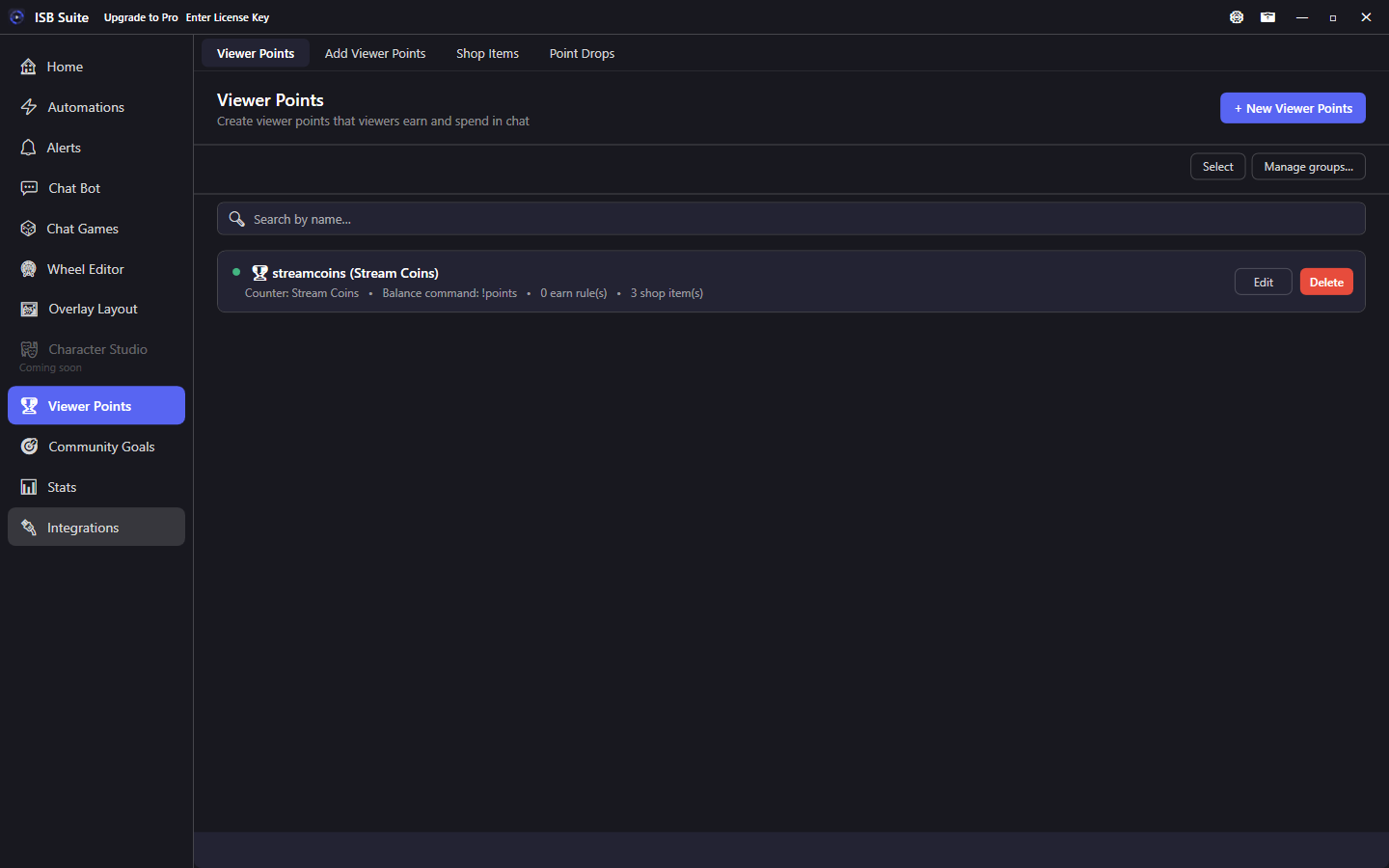
Custom channel currency with earn rules, a redeemable shop, and timed point drops on the overlay.
Leaving a currency, shop item, or point-drop editor with unsaved changes shows Save, Don't Save, or Cancel. Opening an editor and leaving without edits does not prompt.
At a glance
- Balances live on a per-user counter.
- Watching earn rules need Stats - Watch Time and the Twitch chatters scope.
- Event earn rules (chat, follow, sub, bits, raid, channel points, and YouTube Super Chat / members / gifts) award when the chatter has a platform user id.
- Shop items run full Actions (wheel, sound, giveaway, automation, Run Alert, and more).
!shoplists each item's buy command and price.!shop 2turns the page.- Community Goals can spend a bound currency 1:1 into a goal (contribute command on the goal).
- Point Drop needs a Point Drop widget on the active layout.
- Free: 1 currency, 5 shop items per currency, 1 point drop per currency. Full limits on Free and Pro.
Creating a currency
- Give it an internal name and display name.
- Choose or create a per-user counter to back the balances.
- Set the balance command (for example
!points) and response template. - (Optional) Add Earn Rules to award points automatically.
- Add shop items viewers can spend points on.
- Also customize the not-enough-points message and redemption confirmation message.
- Run on Twitch and YouTube sits on the currency, next to Enabled. Shop items, point drops, earn rules, balance, give, gamble, and goal contributions follow that choice. Both stay on until you uncheck one. One side off skips that chat. Both off runs nowhere. Existing currencies stay on both.
Earn rules
On each currency editor, open Earn Rules and click + Add Earn Rule. Points always go to the viewer who earned them (the person who chatted, followed, raided, and so on), not to everyone in chat.
Watching (live presence)
Awards points on a timer while a viewer is in chat during a live stream:
- Set Rule Name and choose trigger Watching (live presence).
- Award every: interval (seconds, minutes, or hours).
- Points they earn: how many points per interval.
- Optional extras for current Tier 1, Tier 2, and Tier 3 subscribers live under Advanced Settings (added on top of the base amount). Prime counts as Tier 1. Set Points they earn to 0 if only subscribers should get points. Gifted subs count. Leave extras at 0 for everyone to earn the same. The same extras can be set on Subscription and Resubscription event rules.
- Save the currency.
Prerequisite: enable Stats - Watch Time. Twitch days need the moderator:read:chatters scope (reconnect on Integrations if that poll is paused). A YouTube-only day still accrues recently-chatted viewers without Helix. Watching earn rules use the same once-per-minute live poll as watch time. YouTube lurkers never earn; only viewers who recently chatted on YouTube (or who are already in Twitch chat) count. See YouTube. If Watch Time is off, the Watching rule shows an error on the rule itself (you can still save it). Turning Watch Time off later pops a warning if Watching rules already exist. Other earn triggers do not need Watch Time.
Event triggers
Same event family Automations already see, when the event carries a Twitch user id:
- Chat Message - that viewer earns after sending the number of chat messages you set (for example 10 messages then 5 points). Commands like
!pointsdo not count. - First-Time Chatter - that viewer earns once the first time they chat (not each stream). After they have sent a message, they are not first-time again. Twitch and YouTube are saved separately. Existing viewers already in your data stay off the list after an update
- Follow
- Subscription. Resubscription months can be At least, Exactly, or Every X (67 waits until 70 for every 10). Blank months pays every resub. Points are awarded once, not per month. Tier extras pay only when the months match
- Subscription Gifter - points go to the gifter. Award per gifted sub is on by default (a bomb of 5 awards 5 times); turn it off to award once per gift event. Existing gift rules stay per-gift. Optional gift count with At least or Exactly; leave blank for every gift
- Subscription Gift Receiver - points go to the person who received the gifted sub
- Raid - points go to the raider. Award per raider is on for new rules; turn it off to award once per raid. Existing raid rules stay once per raid. Optional raider count with At least or Exactly; leave blank for every raid
- Bits - points go to the viewer who spent bits (chat cheer or Power-Up). Award per bit is on for new rules; turn it off to award once per cheer. Existing bits rules stay once per cheer. Optional bit amount with At least or Exactly; leave blank for every spend
- Channel Point Redemption - points go to the redeemer. Optional reward name; leave blank for every reward
- Super Chat and Super Sticker - YouTube only. Award per tier (1-7, not dollars) is on for new rules; turn it off to award once per Super Chat. Existing Super Chat rules stay once per event. Optional tier with At least or Exactly
- Membership Gifter - same per-gift vs once-per-event choice as Subscription Gifter. New Member and Membership Gift Receiver award once per event. Member Milestone months can be At least, Exactly, or Every X (67 waits until 70 for every 10). Blank months pays every milestone, and points are awarded once, not per month. Bits, Super Chat, and Super Sticker stay At least or Exactly. See YouTube
Tiltify donations are not an earn trigger: they do not identify a Twitch viewer, so points cannot attach to a real account.
Viewer and admin commands
- Balance: viewers type
!points(or your custom command) to check their balance, or!points @usernamefor another viewer (Twitch login or YouTube@handle). Allow checking another viewer is on by default.{user}/{balance}are the subject;{caller}is who typed the command. Unknown login uses the not-found template; a resolved viewer with no wallet is a real0. - Shop list: viewers type
!shop(or your custom command) to see each item's buy command and price, for example!spin 100.!shop 2turns the page. The list does not name the currency. Twitch and YouTube pages are different lengths, so page 2 is not the same items on both. Items that are off, locked, or on a currency that does not run in that chat are left out. It is a built-in command, edited from the Shop page the same way as!addgoal. - Give: viewers give their own points to another chatter (for example
!givepoints @handle 100,!givepoints @handle 1k,!givepoints @handle 50%, or!givepoints @handle all).kandmmatch gamble (1k= 1,000,1m= 1,000,000, no space). Percent andalluse the points you can spend above the counter minimum. A YouTube@handlecredits that channel; a linked account cannot give to itself. A name ofallis that viewer, not a broadcast. - Gamble: viewers wager points on a configurable win-chance roll (for example
!gamble 50,!gamble 1k,!gamble 1m,!gamble 50.2,!gamble 34.7%, or!gamble all).kandmsuffixes scale by 1,000 and 1,000,000 with no space (1k, not1 k). Decimals and percents round to a whole stake before the roll. Win chance and jackpot chance can use hundredths, such as 50.55. Optional jackpot under Advanced Settings (off by default): a chance on that same roll pays a payout multiple (default 1% and 5x). A 5x hit on a 50 wager credits 200.{amount}stays the wager, and the jackpot chat line is editable. - Admin give: broadcaster/mods award points from chat (for example
!vpgive @user 100,!vpgive @user 1k, or!vpgive all 1kfor everyone currently in chat). The amount is a flat number ork/msuffix.allis the broadcast target (Twitch Helix chatters plus YouTube recently-chatted, same window as Watch Time, de-duped when those identities are linked), not an amount. Not a live JOIN feed. - Each command supports aliases and optional Match anywhere in message under Advanced Settings.
- Advanced Settings also cover permission, time cooldown (optional burst), and per-stream limits (same unified editor as other commands).
- Community Goals can bind this currency so viewers spend it into a milestone. See Community Goals - Viewer Points contribute.
Shop items
- Shop list command is a built-in command on the Shop page, edited the same way as Community Goals
!addgoal. Default!shop, Everyone, on. Change the name, aliases, Match anywhere, permission, and cooldown from that card. - Viewers spend points to trigger actions: load a wheel, play a sound, start a giveaway, send chat, increment a counter, run an automation, Run Alert, and more.
- Export on a shop item exports that item. Export on the currency exports the whole Viewer Points setup, including earn rules, commands, point drops, and every shop item. Import Package opens any package. See Share a setup.
- Per-item price and purchase confirmation message.
- Advanced Settings: permission, cooldown (optional burst), per-stream limits, command aliases, and Match anywhere. Longer aliases pass the remainder as
{input}.
Useful variables: {balance}, {currencyName}, {price}, {itemName}. Full list: Message variables.
Point drops
Timed events where a configurable image or GIF appears on the overlay; chatters type a claim command to take a share of the drop. Configure under the Point Drops sub-tab:
- Drop interval: how often (in minutes) the drop can spawn.
- Spawn chance: percentage probability at each interval check.
- Display duration: how long the drop image stays visible.
- Claim command: chat command viewers type to claim (aliases and Match anywhere supported).
- Export on a point drop shares that drop and the currency it belongs to. See Share a setup.
- Claim slots: randomized range (min/max) for how many successful claims can happen before the drop ends.
- Points per claim: how many viewer points each successful claim awards (default 1).
- Drop image/GIF: shown in the Point Drop widget on your overlay. Browse a new file, or Library to reuse one. Clear detaches it from this drop. The Media Library copy stays. See Media library.
- Optional spawn sound with volume control. Library reuses a sound the same way. Clear detaches it. A drop with no image can still be saved.
- Optional already-claimed chat message when a viewer tries to claim again on the same drop (one claim per viewer). Leave the field empty to stay silent.
- Supports only-when-live mode to skip starting-soon screens.
Spawn, claim, already-claimed, and expiry messages can use {amount} for points per claim, {pool} / {claimsLeft} for claim slots, and {pointsPool} / {pointsLeft} for total/remaining points (slots x amount). Prefer {pointsLeft} when Points per claim is greater than 1 so chat does not look like a slot count. An active drop is frozen at spawn: claim amount, claim slots, claim command, and chat templates stay as they were when that drop appeared. Saving the Point Drop editor updates the stored config for the next spawn only. Related: Overlay Layout - Point Drop, Counters and Stats (Watch Time), Use cases.