
Home / Features / Community Goals
Community Goals
Stream-wide milestones fed by Twitch events, live Helix channel totals, chat message patterns, Viewer Points spend, or manual pushes from automations.
Leaving Add/Edit Goal with unsaved changes shows Save, Don't Save, or Cancel. Opening a form and leaving without edits does not prompt. Form Cancel discards without asking.
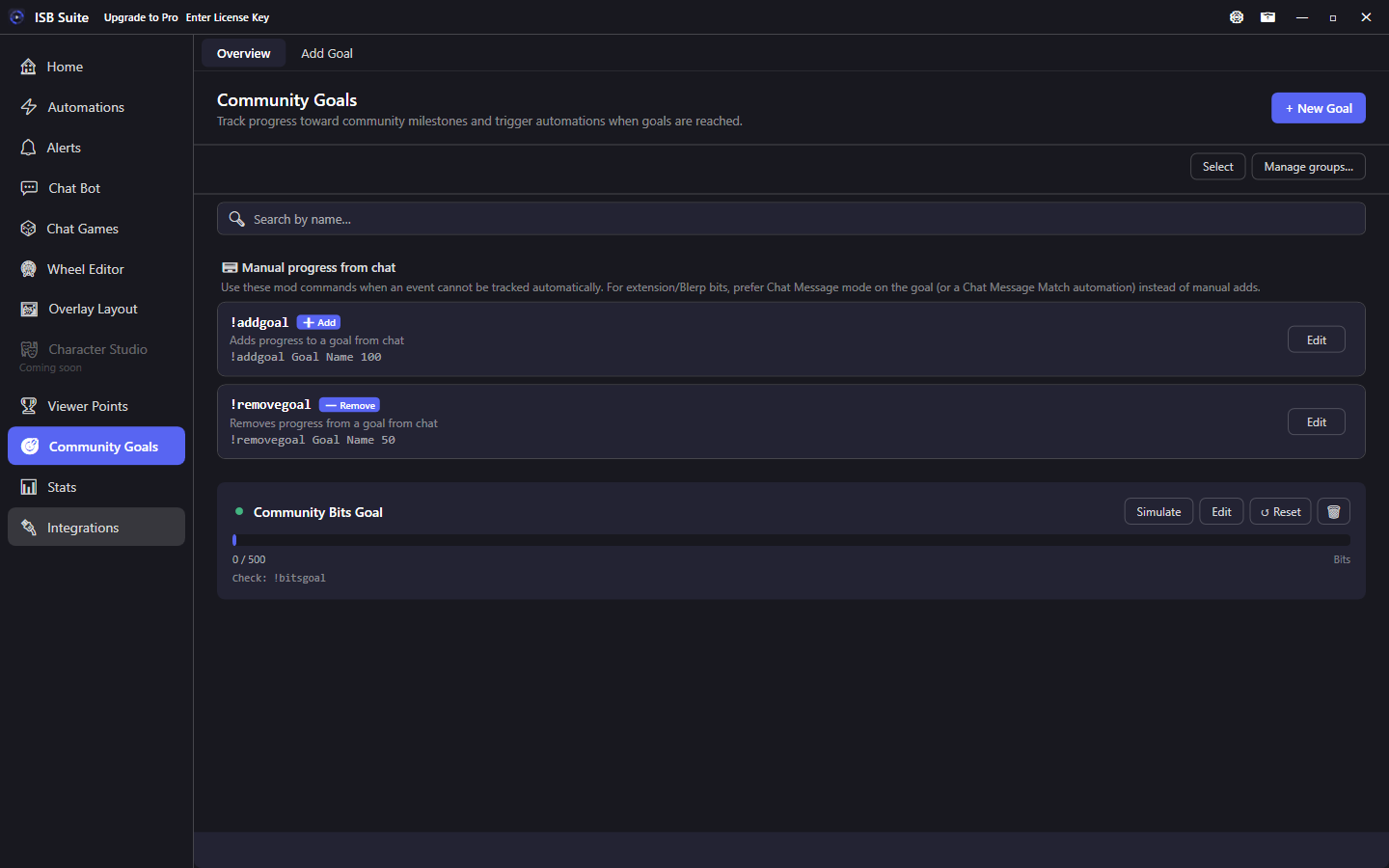
At a glance
- Increment modes (combine freely): Manual, Twitch Data, Chat Message, Viewer Points. Or exclusive Live Totals (current followers, subscribers, or sub points from Helix).
- When the limit is hit (increment modes): Carry Over, Zero Out, or Stop at limit (bar stays full until Reset). Live Totals does not use those reset modes.
- Check command example:
!bitsgoalreplies with{goalProgress}like15/100. - Viewer Points contribute: viewers spend a bound currency 1:1 into the goal (for example
!goal 50). Stop-at-limit goals reject further spend once the bar is full. - Fire Automations or Custom Alerts on Community Goal Reached.
- Do not double-count Blerp-style bits (use Chat Message mode or Chat Message Match push, not both).
- Free: 3 community goals. Full limits on Free and Pro.
- Export on a goal shares that goal. See Share a setup.
Accumulation modes
Set a limit and one or more increment modes (checkboxes; combine freely), or check exclusive Live Totals:
- Twitch Data: pick one or more EventSub sources from the dropdown (Bits / Cheer, Power-Up, new sub, resub, gifted, follows, raids). New sub matches first-time New Subscription, not a resub. New, resub, follows, and raids always add +1; Bits, Power-Up, and gifted subs use Count method (raw amount or +1 per event). This is still this-session event counting - it does not show the channel's current sub or follower total.
- YouTube: Super Chat, Super Sticker, New Member, Member Milestone, and membership gifts are their own sources (not Bits or Subs). See YouTube.
- Chat Message: watch a specific chatter and a pattern with
<amount>(useful for extension bits that never fire as Twitch cheers). - Viewer Points: viewers spend a bound currency into this goal (1 point = 1 progress).
- Manual: progress from Push Community Goal actions only.
- Live Totals: exclusive. The bar is the current Helix total. See Live Totals.
Automations can also use Chat Message Match plus Push Community Goal with Use amount from trigger.
Live Totals
Check Live Totals on a goal (it clears the other four modes) and pick one metric:
- Followers: current channel follower count. Works for every channel.
- Subscribers: current subscriber count (Affiliate / Partner).
- Sub Points: Twitch subscriber points (T1=1, T2=2, T3=6).
ISB Suite seeds the number from Helix when Twitch connects and when you save the goal, then refreshes about every 60 seconds and shortly after follow / sub / gift / sub-end events. A failed Helix call leaves the last value (it does not zero the bar). Unfollows are picked up on the next Helix read - Twitch has no unfollow EventSub.
Goal Reached fires when the live total first crosses the limit after the goal is saved. Enabling a goal that is already over the limit (for example 800 current subs with a 500 limit) does not fire. Later polls at the same value do not re-fire. The bar can show over 100% on the overlay - that is the real total, not a clamp.
Carry Over, Zero Out, Stop at limit, and reset-on-stream-start are hidden for Live Totals. Overview Reset re-syncs from Twitch instead of zeroing. Simulate is disabled. This-session New / Resub / Gifted Sub goals stay on Twitch Data - use a second goal if you want both.
Reset behavior
Choose what happens when progress hits the limit:
- Carry Over: overflow counts toward the next cycle. The bar can look empty right after an exact hit. Goal Reached still fires, and further progress continues.
- Zero Out: the bar resets to 0 after each completion. Goal Reached fires, and further progress continues.
- Stop at limit: the bar stays full. Goal Reached fires once. Twitch, chat, Push, and Viewer Points add nothing more until you Reset (or stream-start reset, if that is on). Decrementing below the limit reopens the bar.
Manual Reset zeros the bar and cycle count. If viewers have contributed Viewer Points, the confirm dialog says those points are not refunded. Use Refund VP to credit them and reset the bar. Reset-when-stream-starts also does not refund (no dialog). Live Totals Reset re-reads Helix instead of zeroing.
Viewer Points contribute
Enable Viewer Points on the goal and pick an enabled, unlocked currency. Viewers spend that currency 1:1 onto the bar. A SQLite ledger remembers each account's spend so you can refund later.
- Contribute command is optional. Leave it empty to keep Viewer Points on but disable chat contribute. Viewers type the command plus a whole number (for example
!goal 50). Bare command with no amount is not a contribute. - The contribute name may match the Check command:
!goalchecks progress,!goal 50spends 50. Longest match and leftover text still apply. - Advanced Settings: aliases, match anywhere, permission, cooldown (optional burst), and per-stream use limits (same as other chat commands). Optionally cap how many points can go into the goal this stream, and how many each viewer can put in this stream. Leave those boxes blank for no cap.
0means no points are accepted. A typed amount larger than the remaining room is reduced to that remainder; chat explains when a cap is already full. Amount caps reset on a new stream and when you Refund VP. - Success and not-enough templates use contribute tokens such as
{amount},{balance},{currencyName}, and goal progress tokens. Full list: Message variables - Community Goals. - Contribute commands appear on the Chat Bot overview. They are not a Run Chat Bot or Automation nested target.
- On a Stop at limit goal, further spend is rejected once the bar is full (chat:
This goal is already complete.). If the typed amount is larger than the remaining gap, only that remainder is spent and the success template{amount}is the applied amount.
Refund Viewer Points (overview or editor) credits every ledgered account, clears this goal's ledger, and resets the bar and cycle count. Goal Reached automations are not undone. Reset progress also does not refund (the Reset confirm dialog says so when the ledger has points). Delete with a ledger offers Refund and delete; if refund fails, the goal is not deleted.
Related: Viewer Points.
Check commands
- Optional Check Command per goal (for example
!bitsgoal) so anyone in chat can ask for progress. - Customizable response template. Default
{goalProgress}replies like15/100. - Other tokens:
{goalName},{goalCurrent},{goalLimit}. - Advanced Settings: aliases, match anywhere, permission, cooldown (optional burst), and per-stream limits (same as other chat commands).
- Check commands also appear on the Chat Bot overview; Edit opens that goal's settings.
Extension / Blerp bits
Chat Message mode watches a specific chatter and a pattern with <amount> (for example used <amount> bits). A line like CoolViewer used 25 bits to play ... becomes +25. Prefer this or a Chat Message Match automation that pushes the same goal - do not use both, or progress doubles.
When a goal is reached
Trigger Automations or Custom Alerts on Community Goal Reached (optional filter by goal). Related: Use cases, Message variables.