
Home / Features / Actions / Start Giveaway Session
Start Giveaway Session
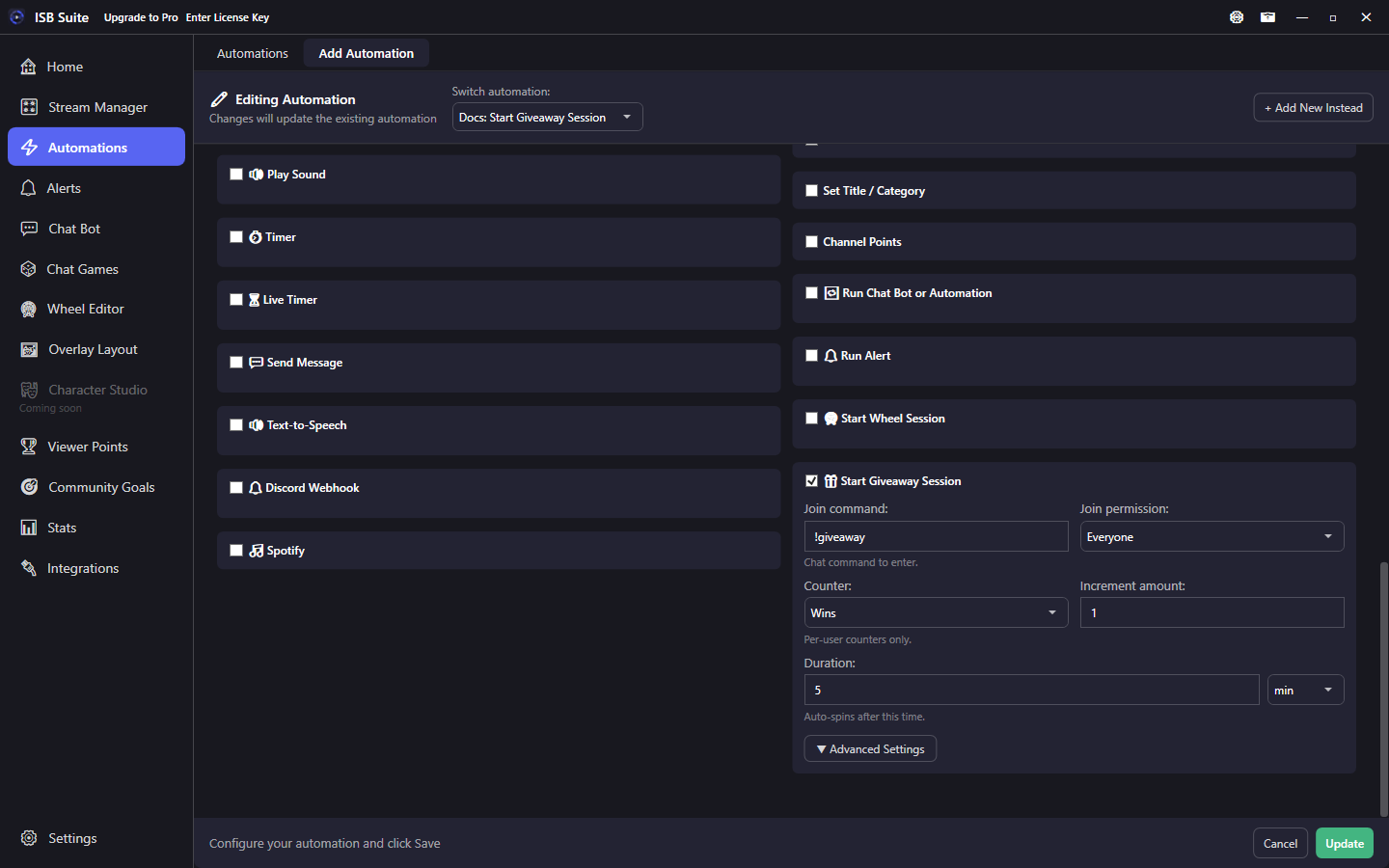
Open a timed giveaway that chatters join with a command. When time is up, a winner is chosen. Paying the winner and saving join or win counts are optional.
At a glance
- UI label: Start Giveaway Session.
- Starts an empty joinable session; viewers type the join command (default
!giveaway). - Duration auto-resolves the winner. Every counter is optional. (No counter) pays nothing and saves nothing.
- Related: Queues and Giveaways.
How it works
On fire, ISB Suite opens a joinable giveaway session. Viewers enter with the configured command (permission gated). When the duration elapses, a winner is picked. Winner chat, sound, and TTS are optional. Paying the winner and saving join or win counts are optional too, and each giveaway chooses its own counters. Duplicate joins can get an already-joined reply with its own cooldown. Queue and inspect details: Queues and Giveaways. Counter choices: Counters.
Setup
- Enable Start Giveaway Session.
- Set join command, join permission, and duration.
- Leave Winner reward on (No counter) to pay nothing. Pick a per-user counter and a reward amount only when this giveaway should pay the winner.
- Open Advanced if this giveaway should count joins or wins. Leave those on (No counter) to skip them.
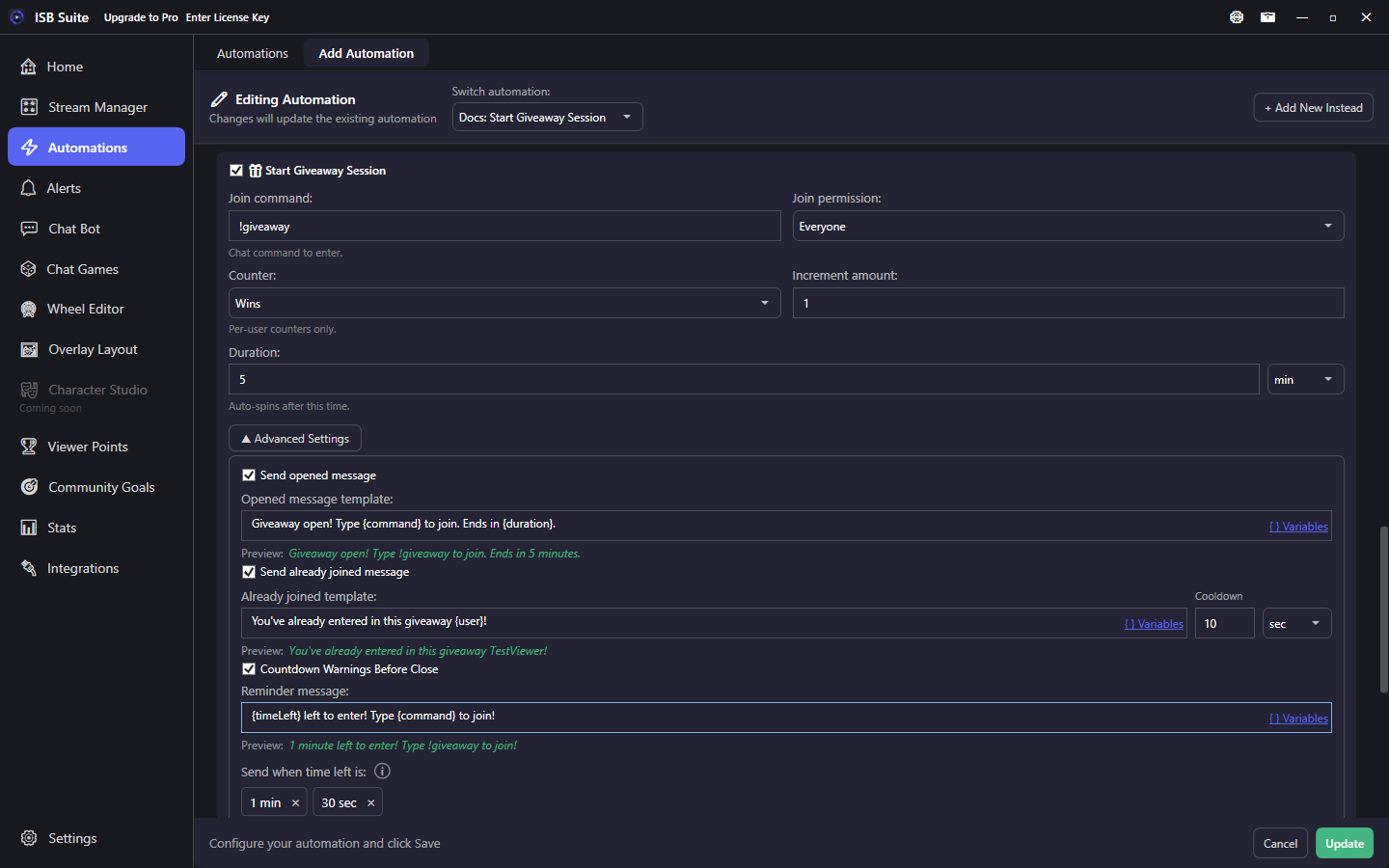
- Tune opened / already-joined / winner messages, then countdown offsets if you want reminders.
Options
- Join command / Join permission: who can enter and with which command.
- Duration: seconds, minutes, or hours until auto-resolve.
- Winner reward and Reward amount: on the card. See Counters.
- Send opened message / already joined message / winner chat: templates with variables such as
{user},{timeLeft},{duration}. When a winner reward is set, winner chat can also use{count},{value}, and{counterTier}for that reward balance. - Winner sound / winner TTS: optional celebration when the winner is chosen. Winner sound can come from Library. Clear detaches that sound from this giveaway and leaves the Media Library copy. See Media library.
Counters
Every counter on a giveaway is optional. (No counter) is the default, so a giveaway can pay nobody and save no stats. Each giveaway picks its own counters, so one game can track joins and wins while another saves nothing. + New creates a per-user counter and selects it on that row. The Free counter limit still applies.
- Winner reward and Reward amount stay on the card. The amount is added only to the winner, when the wheel lands. Pick a Viewer Points counter here to pay out that currency. (No counter) pays nothing. A giveaway you already saved keeps its old winner counter on this row. Skip, or a round with no entries, does not pay. Winner chat
{count},{value}, and{counterTier}read this balance when a reward is set. - Join counter is under Advanced. It adds 1 when chat accepts that viewer. A repeat of the join command does not add another. Removing them and letting them re-join counts again.
- Win counter is under Advanced. It adds 1 when the wheel lands on that viewer. This is a count of wins. It is separate from the reward amount.
To count who redeemed or started the giveaway, add a Counter Action on the same rule. That counts the viewer who triggered it, by the amount on the Counter Action. A channel-point redeem or a chat command has that viewer. A timer, or any fire with no viewer, has nobody to count.
The numbers show on Stats, in CSV export, and in {counter:Name}.
Advanced settings
Join counter and Win counter are the first rows. Both default to (No counter). Details are in Counters.
Below those: an editable reminder message plus custom remaining-time offsets (same style as chat-game and Ad Break pre-warnings). Offsets at or beyond the giveaway length are skipped. Use {timeLeft} and {duration} in reminder text.
Use cases
- Friday prize with its own stats - Winner reward pays a Viewer Points counter. Advanced join and win counters are Friday Joins and Friday Wins. A Counter Action on the same rule adds 1 to Friday Redeems for the viewer who started it. A different giveaway can use other counters, or none.
- No stats - Leave winner reward, join, and win on (No counter). The giveaway still runs. Nothing is saved and nobody is paid.
- Sub-only redeem - Channel points "Start giveaway" -> same action with Subs+ join permission so only subs can enter.
- Reminder-heavy hype - Longer duration with Advanced offsets at 5m / 1m / 30s so chat gets nudged before close.