
Home / Features / Actions / Live Timer
Live Timer
Drive a Live Clock on a Timer Widget. Countdown or count up, with pause, add, remove, and set. Separate from the delay-queue Timer action.
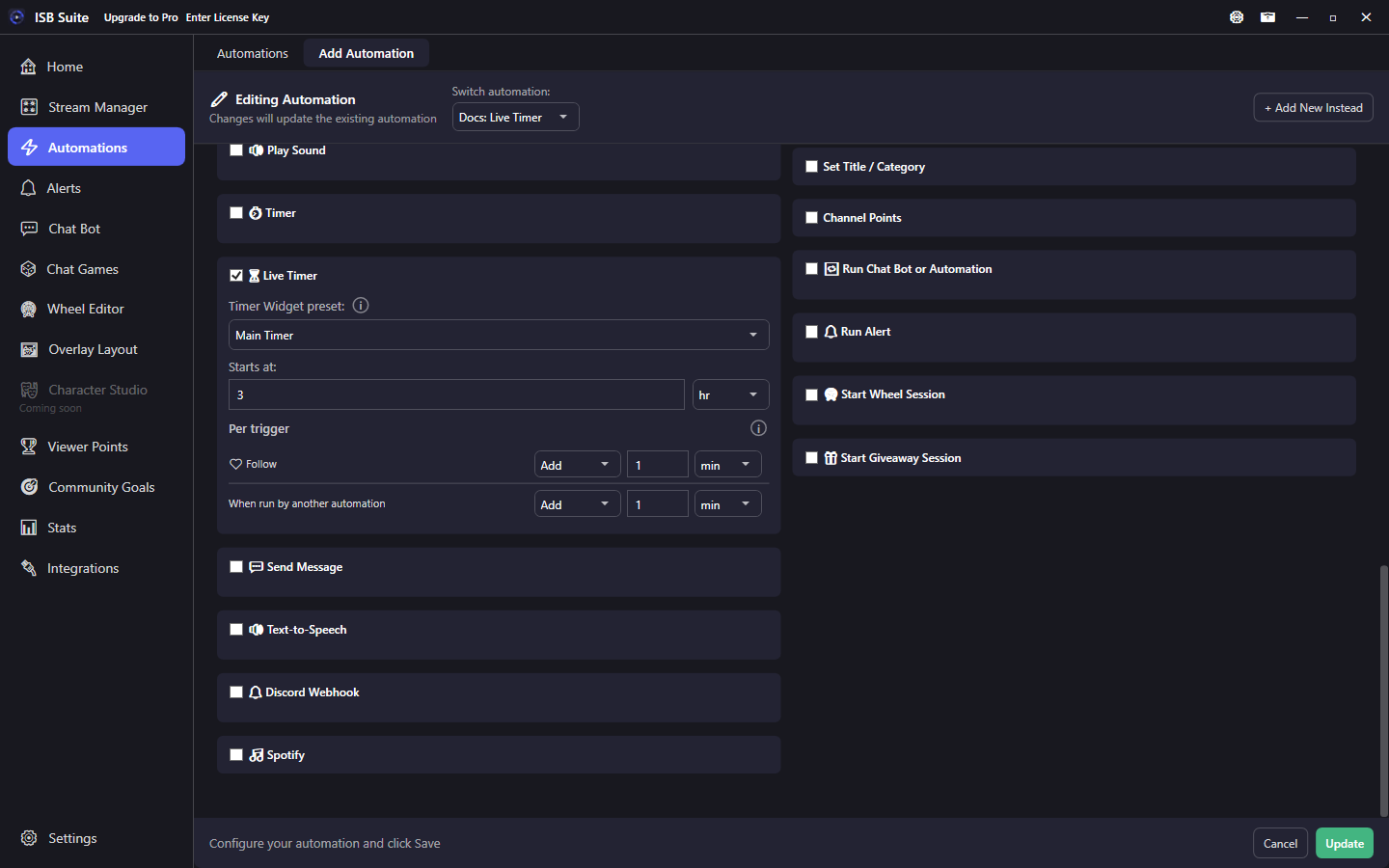
At a glance
- UI label: Live Timer.
- Requires a Timer Widget preset. Direction is Countdown or Count up on that preset.
- Starts at + a per-trigger table (Add / Start / Ignore). Applies immediately, like counters.
How it works
Enable Live Timer, pick a Timer Widget preset, set Direction and Starts at, and fill the per-trigger time table. When the rule fires, the Live Clock updates right away (Add time, Start from Starts at, or Ignore). Nested Run Chat Bot or Automation gets its own row in that table.
Countdown shows time left. Count up shows elapsed time. The switch is saved on the Timer Widget preset, so Overlay Layout shows the same choice. A clock that is already running keeps the direction it had at Start until you End it. Flipping the switch does not change a saved Starts at.
On a count-up clock, Starts at is the opening elapsed time. 0 starts at 0:00. A countdown still needs a Starts at greater than zero.
You can also use a delay Timer on the same rule; Live Timer still applies immediately while other actions wait for the delay.
Setup
- Create a Timer Widget preset in Overlay Layout, set it to Live Clock, and place the widget on a layout.
- On the automation, enable Live Timer, pick that preset, set Direction and Starts at, and choose Add / Start / Ignore per trigger.
- (Optional) Add a Live Timer Ended trigger on another rule. Countdown fires it at zero. Count up fires it when elapsed reaches Max.
Live Timer vs Timer
- Live Timer: Live Clock that counts down or counts up. Overlay Layout Start / Set / Pause / Resume / End. Optional max and accept-adds-while-paused.
- Timer: delay-queue wait before deferred actions on that rule. Not for adding time from bits/subs.
Do not use a long delay Timer to fake a subathon. Use Live Timer + Live Clock.
Chat and Live Timer Ended
Mods use !pausetimer, !resumetimer, !addtime, !removetime, !settime, !endtimer, and !cleartimer with the Timer Widget name. A duration can be one amount (5m) or pieces that add (3m 12s). Pause, resume, add, remove, and set live under Chat Bot - Live Timer Commands. !endtimer and !cleartimer stay under Built-in Commands. Full list: Chat commands.
Live Timer Ended fires when a countdown hits zero, or when a count-up clock reaches its max (optional Timer Widget filter). Manual End and !endtimer do not fire it. Remove on a count-up clock stops at 0:00 and keeps running. Set to 0 ends a countdown and leaves a count-up clock running at 0:00. !settime does not start an idle clock.
Examples
- Bits -> Live Timer Add 30s; Gift Subs -> Add 2m; chat command -> Start from Starts at.
- Extension / Blerp bits -> Chat Message Match (bot username +
used <amount> bits) with Count each + Live Timer Add (same pattern as Bits). Do not also add a Bits cheer trigger for the same Blerp line. - Live Timer Ended -> Send Message + Play Sound when a countdown hits zero, or when a count-up clock reaches its max.
Related: Timer Widget, Use cases - Subathon Countdown, Timer (delay), Automations (Chat Message Match).