
Home / Features / Stream Manager / Predictions
Predictions
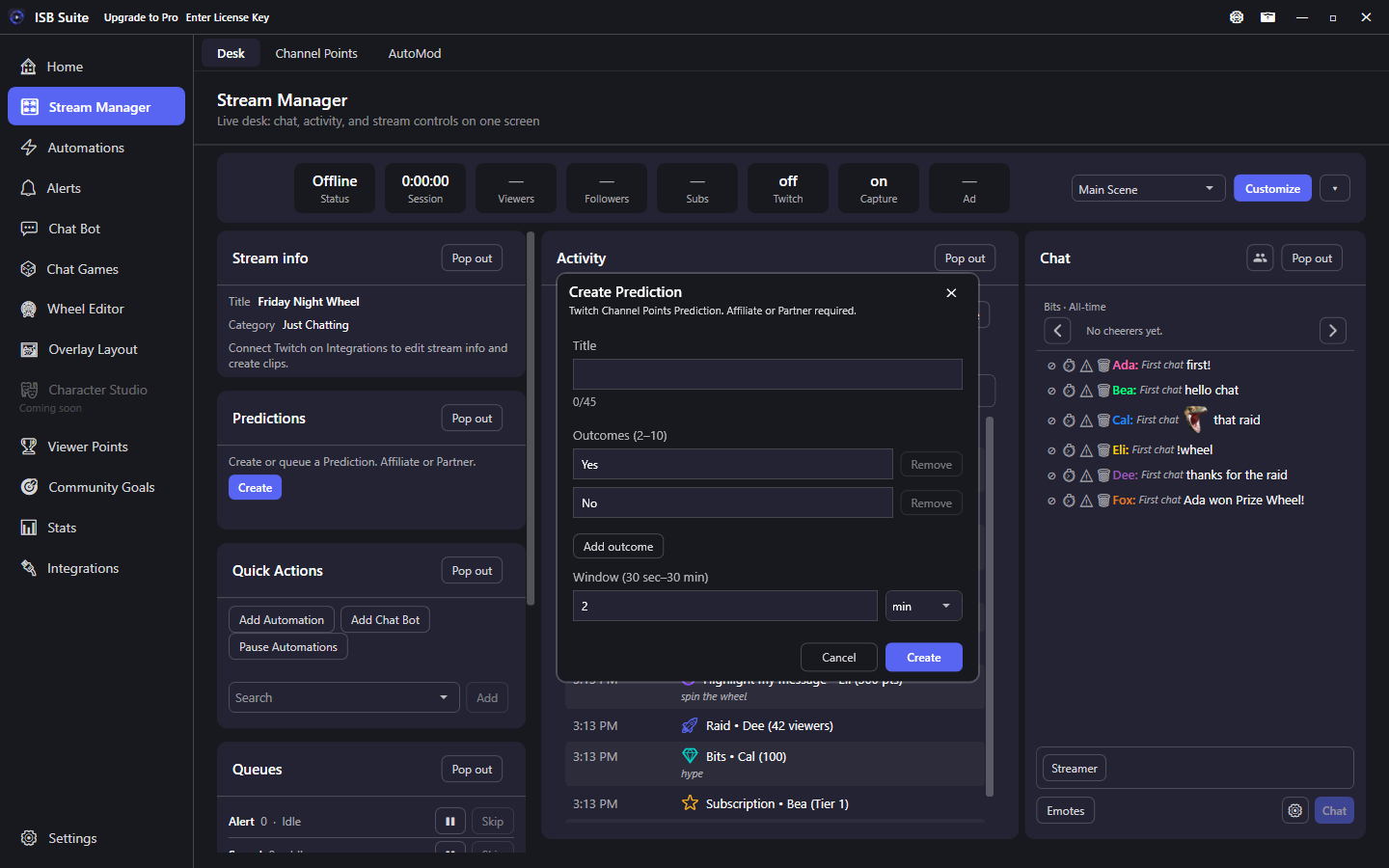
The Predictions tile creates a Channel Points Prediction from the desk and manages the live one. Create opens a popup for title, 2-10 outcomes, and the window. While a Prediction is ACTIVE or LOCKED, the tile shows the title, time left, and bet counts, with Lock, Cancel, and Pick winner. Queue next opens the waiting list and shows how many drafts are waiting. Queue next inside that list adds another. Click a row to remove it. There is no queue cap.
At a glance
- Desk tile, visible by default under Stream info.
- Title max 45 characters. Outcomes 2-10 (default Yes / No), 25 characters each. Window 30 seconds to 30 minutes (default 2 min). Enter sec or min.
- Requires Affiliate or Partner and
channel:manage:predictions. Re-authenticate Twitch once if you connected before this feature. - Only one Prediction can be ACTIVE or LOCKED. Create is hidden while one is live. Queue next opens the waiting list, shows how many are waiting, and saves drafts on this PC with no cap. Queue next inside that list adds another. Remove a row from the list. The next starts after resolve or cancel, including when that happens on Twitch.
- Manual create, lock, resolve, and cancel record Activity. Automations can also create via the Create Prediction action. If a Prediction is already live, that action queues the draft here instead of dropping it.
- No auto chat announce. Add a Send Message action on a rule if you want to post the title. Stream Manager Chat shows the live Prediction above the transcript, including one started on Twitch, and keeps the result up for 30 seconds. Close it sooner with the X once a winner, a refund, or a poll with no votes is showing. That also clears the matching desk tile. A Twitch Poll uses the same kind of card.
Create
- Connect Twitch on Integrations. Grant Predictions management if prompted.
- Open Stream Manager. Click Create on the Predictions tile.
- Enter a title, at least two outcomes, and a window (seconds or minutes). Create sends the Prediction to Twitch.
The tile then shows the live Prediction. Activity shows the created title.
Manage
While a Prediction is running, the tile shows the title, remaining time, and a bar for each outcome. Viewers opens the top 10 names Twitch sent for each side. After a winner, that list shows points won and points lost. Lock stops new bets early. Cancel refunds everyone (the tile asks first). Pick winner opens a popup with live totals; choosing an outcome pays those viewers. Stream Manager Chat shows the same Prediction above the messages. End, cancel, and pick winner stay on this tile.
After the window ends, Twitch locks the Prediction. You still have to pick a winner or cancel before you can create another. A winner or a refund stays on the tile for 15 seconds. A clear winner stays bright and the other outcomes fade. A new Prediction replaces the result immediately. The tile also picks up a Prediction started on Twitch or by an automation (within about 15 seconds).
Queue
While a Prediction is live, Create stays hidden. Queue next opens the waiting list, shows how many are waiting, and saves the draft on this PC with no cap. Queue next inside that list adds another. Remove a row from the list. The Create Prediction action also queues here when Twitch already has one ACTIVE. When the live one is resolved or canceled - here or on Twitch - ISB Suite starts the next queued Prediction even if Stream Manager is closed.
Limits
- Twitch allows one ACTIVE or LOCKED Prediction per channel. You cannot edit the title, outcomes, or window after create.
- If you do not resolve or cancel within 24 hours, Twitch refunds everyone.
- Related: Create Prediction action for rules. Activity shows manual create, lock, resolve, and cancel.